Building an AWS IAM Sentinel
The purpose of this project is to learn how to deploy infrastructure as code and trigger alerts on Slack when there is a change in privileges.
The architecture is based on CloudTrail, IAM, Lambda, Terraform, and Slack.
Before deploying this project, your AWS account must have permissions to create IAM roles, CloudTrail, EventBridge rules, Lambda functions, and SNS topics. On your machine, you need Terraform installed and configured with aws configure, and access to a Slack workspace where you can install the Incoming Webhooks app.
How it works:
CloudTrail records IAM management events and stores them in the S3 bucket. EventBridge listens for AWS API calls via CloudTrail events from the aws.iam source and forwards them to the iam-sentinel-detector Lambda function.
The Lambda code checks if the incoming eventName is part of the HIGH_RISK_EVENTS list and, if so, formats a JSON payload and sends it to Slack using the webhook URL. The same alert is also published to the SNS topic so it can be reused for email, SMS, or other subscribers.
You can check the whole code of this project here: https://github.com/alexbaracat/AWS-IAM-Sentinel
Project folder should look like this:
iam-sentinel/
│
├── terraform/
│   ├── main.tf
│   ├── cloudtrail.tf
│   ├── eventbridge.tf
│   ├── lambda.tf
│   ├── iam.tf
│   ├── sns.tf
│   ├── variables.tf
│   ├── outputs.tf
│
├── lambda/
│   └── handler.py
│
└── README.md
.gitignore:
# Terraform local cache
.terraform/
terraform/.terraform/

# Terraform state files
*.tfstate
*.tfstate.*
*.tfstate.backup

# Local / sensitive variable files
terraform.tfvars
*.tfvars
*.tfvars.json

# Crash logs
crash.log
crash.*.log
Once the initial setup is done, go to Slack Marketplace and search for Incoming WebHooks.
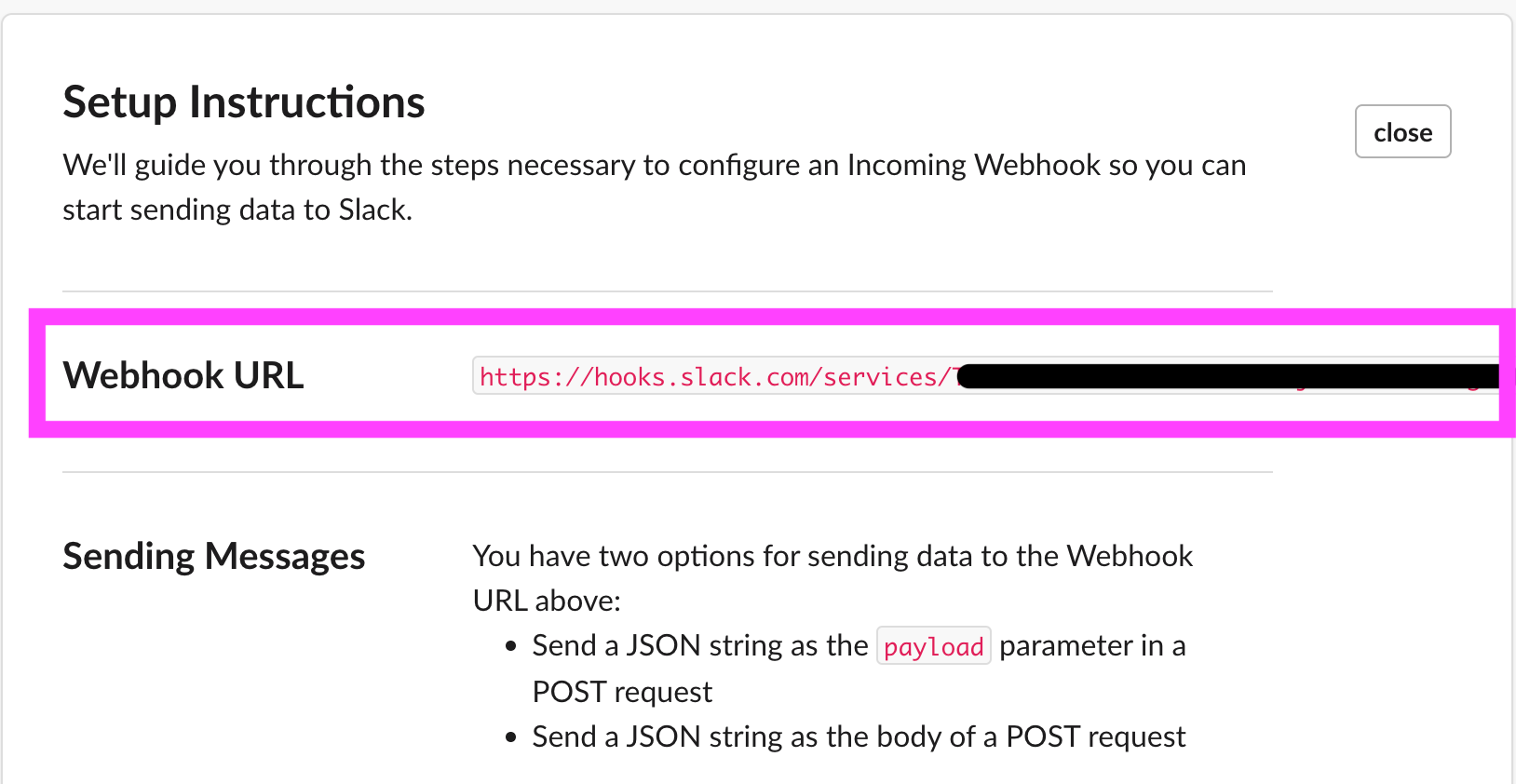
Once properly set up, you will be granted a URL Webhook, which will integrate our Lambda function to Slack.

I started from the security goal “When something dangerous happens in IAM, I want a message in Slack.” From that, the shape of the function was obvious: it needs to receive IAM events (via CloudTrail + EventBridge), decide if the event is high-risk, and, if so, send a notification. That’s where the HIGH_RISK_EVENTS list comes from, a set of IAM API calls that change users, groups, roles, or permissions in ways a SOC would care about (CreateUser, AttachUserPolicy, CreateAccessKey, AddUserToGroup, etc.).
The Slack webhook and SNS topic ARN are pulled from environment variables (SLACK_WEBHOOK, SNS_TOPIC_ARN), which Terraform injects when it creates the Lambda. I used only the Python standard library for sending data to Slack, so the function runs in Lambda without extra dependencies or layers.
Then I wired everything together. lambda_handler parses the incoming event (eventName, user, sourceIPAddress, requestParameters), checks if the event is in HIGH_RISK_EVENTS, and, if it is, builds a small alert object. If the event isn’t of our interest, it logs an Ignored event as "..." and exits.
handler.py
import json
import boto3
import os
import urllib.request

sns = boto3.client("sns")

SLACK_WEBHOOK = os.getenv("SLACK_WEBHOOK")
SNS_TOPIC_ARN = os.getenv("SNS_TOPIC_ARN")

HIGH_RISK_EVENTS = [
    "CreateUser",
    "DeleteUser",
    "CreateAccessKey",
    "PutUserPolicy",
    "AttachUserPolicy",
    "AttachGroupPolicy",
    "AttachRolePolicy",
    "UpdateAssumeRolePolicy",
    "AddUserToGroup",
    "RemoveUserFromGroup",
]


def send_slack_message(text: str) -> None:
    """Send a simple text message to Slack via incoming webhook."""
    if not SLACK_WEBHOOK:
        print("SLACK_WEBHOOK not set, skipping Slack.")
        return

    payload = {"text": text}
    data = json.dumps(payload).encode("utf-8")

    req = urllib.request.Request(
        SLACK_WEBHOOK,
        data=data,
        headers={"Content-Type": "application/json"}
    )

    try:
        with urllib.request.urlopen(req) as resp:
            print("Slack response status:", resp.status)
    except Exception as e:
        print("Slack delivery failed:", str(e))


def lambda_handler(event, context):
    # Basic debug
    print("Received event:", json.dumps(event))

    detail = event.get("detail", {})
    event_name = detail.get("eventName")
    user = detail.get("userIdentity", {}).get("arn", "Unknown")
    source_ip = detail.get("sourceIPAddress", "Unknown")
    request_params = detail.get("requestParameters", {})

    if event_name in HIGH_RISK_EVENTS:
        alert = {
            "severity": "HIGH",
            "event": event_name,
            "user": user,
            "source_ip": source_ip,
            "parameters": request_params,
        }

        slack_text = (
            "🚨 *IAM Sentinel Alert — HIGH RISK*\n"
            f"*Event:* `{event_name}`\n"
            f"*User:* `{user}`\n"
            f"*Source IP:* `{source_ip}`\n\n"
            "```json\n"
            f"{json.dumps(request_params, indent=2)}\n"
            "```"
        )

        # Slack
        send_slack_message(slack_text)

        # SNS
        if SNS_TOPIC_ARN:
            try:
                sns.publish(
                    TopicArn=SNS_TOPIC_ARN,
                    Message=json.dumps(alert),
                    Subject=f"IAM Sentinel Alert - {event_name}",
                )
                print("SNS alert sent.")
            except Exception as e:
                print("SNS publish failed:", str(e))
        else:
            print("SNS_TOPIC_ARN not set, skipping SNS.")
    else:
        print(f"Ignored event: {event_name}")

    return {"status": "ok"} safe?
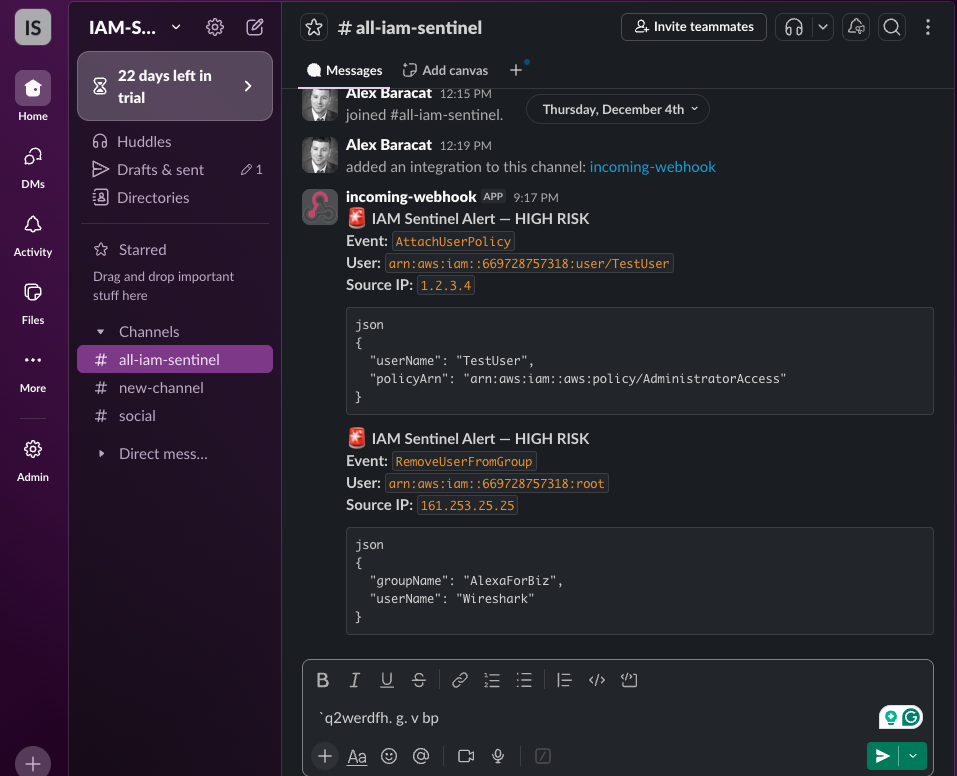
How to test:
To test the setup, you can either use the Lambda console or make a real IAM change. In the Lambda console, create a test event with eventName set to something like AttachUserPolicy or CreateAccessKey, and run the function. You should see a new message in your Slack channel and logs in CloudWatch. For a more realistic test, attach a policy like AdministratorAccess to a test user in IAM and confirm that an alert is generated.